

1. The Core Philosophy: Why Folder Structure = Autonomy
An agentic AI system is only as capable as the context it can retrieve. The folder structure is not mere organization-it is the agent’s operating system. Every directory is a decision boundary. Every file is a callable unit of knowledge. When an agent encounters a task, it should be able to navigate to the right knowledge, load the right constraints, and execute without asking the human what to do next.
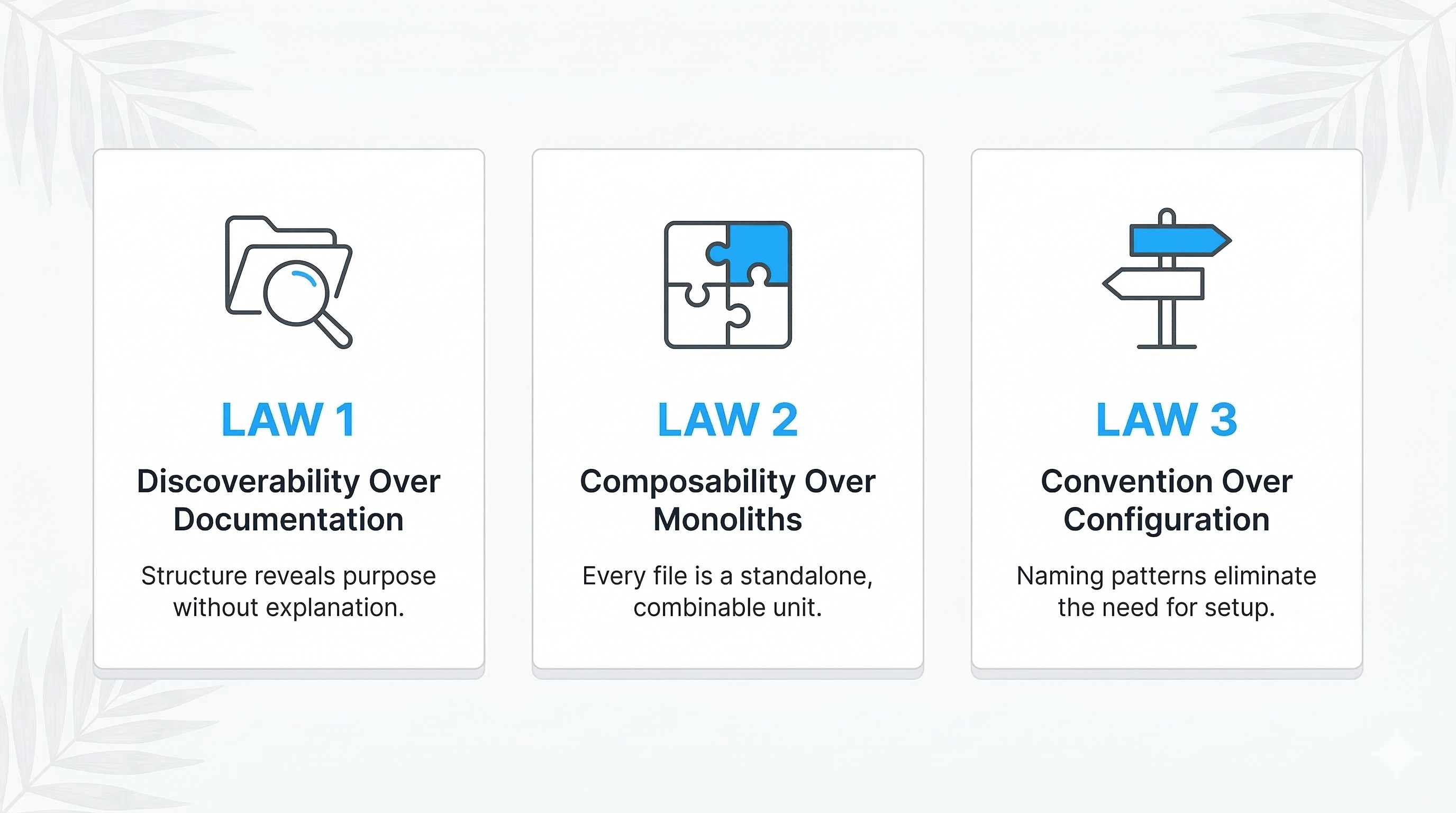
1.1 The Three Laws of Agentic Architecture
MENTAL MODEL
Think of your folder structure as a city. The agent is a taxi driver. Streets (paths) must be predictable. Addresses (filenames) must be unambiguous. The driver should never need to ask a passenger for directions-the city layout itself is the map.
Law 1: Discoverability Over Documentation. The agent should be able to infer purpose from structure alone. If a folder is named /constraints/tone-of-voice/, the agent knows what lives there without reading a README. Documentation is a fallback, not a crutch.
Law 2: Composability Over Monoliths. Every file should be a discrete, self-contained unit that can be loaded independently or combined with others. A persona file + a constraint file + a template file = a complete generation pipeline. No single file should try to contain everything.
Law 3: Convention Over Configuration. The agent should not need a config file to understand how to traverse the tree. Naming patterns, nesting depth, and file types should follow rigid, predictable conventions. When convention is strong, configuration becomes optional.
1.2 The Autonomy Spectrum
Not all agentic systems need the same depth. This blueprint scales from simple to fully autonomous:
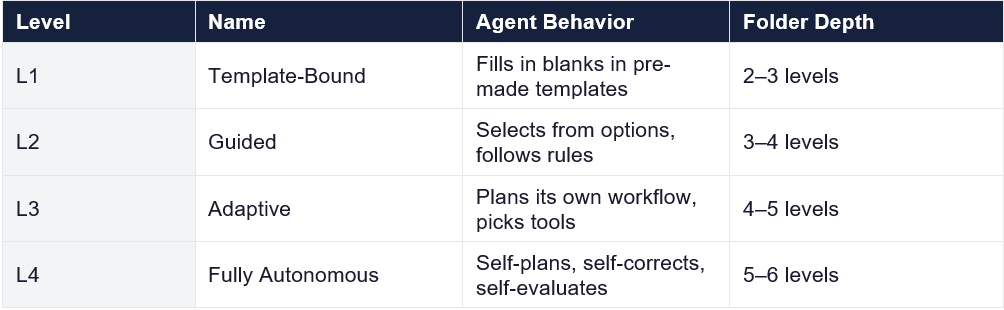
This blueprint is designed for L4 but every component is optional-strip what you don’t need.
2. The Master Folder Structure
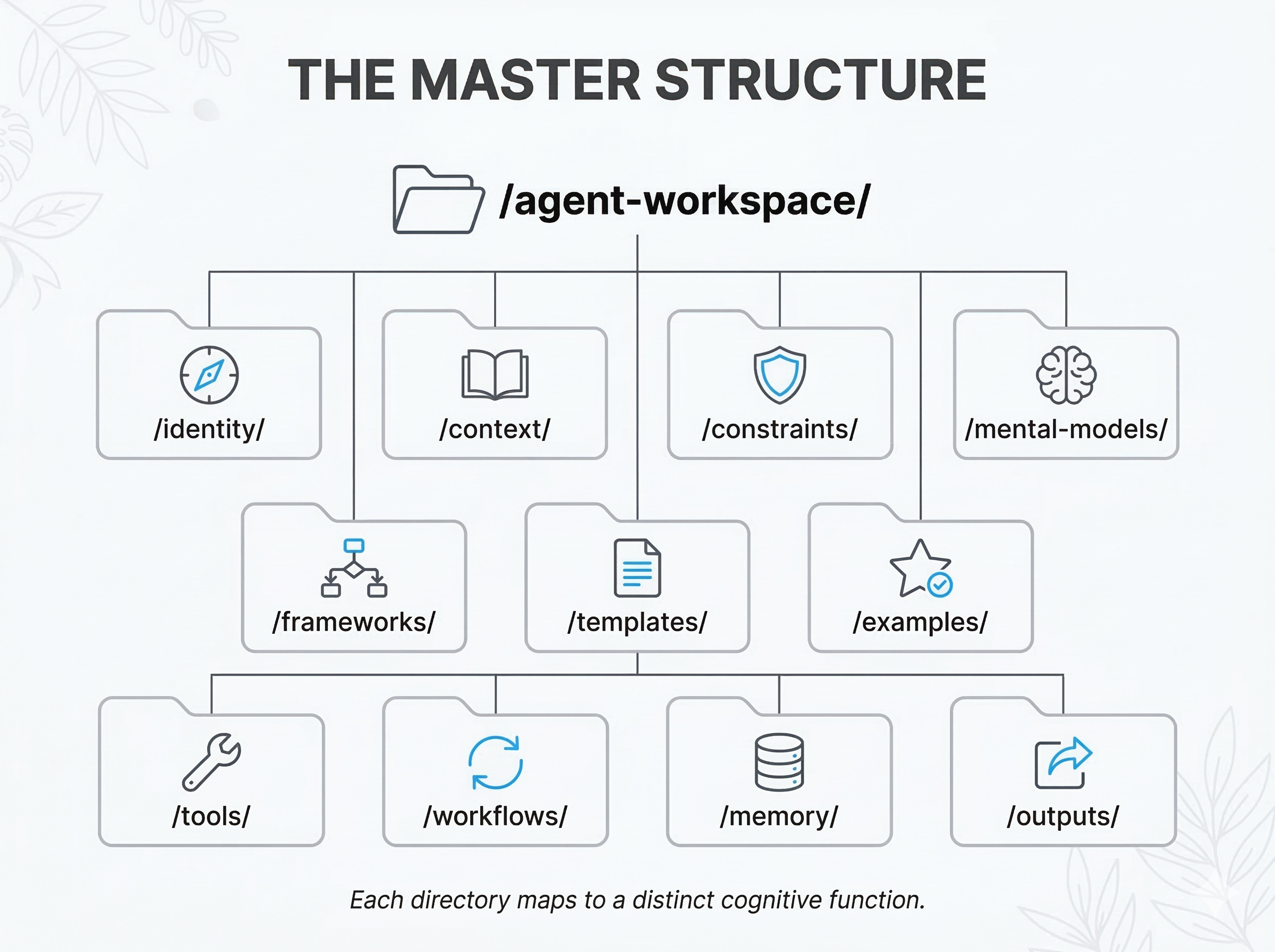
Below is the complete canonical tree. Each directory is explained in depth in subsequent sections. The structure is domain-agnostic: it works identically whether the agent is writing blog posts, generating code, producing marketing assets, or running data pipelines.
/agent-workspace/
├── /identity/
│   ├── persona.md
│   ├── voice-and-tone.md
│   ├── values.md
│   └── role-definition.md
├── /context/
│   ├── /domain-knowledge/
│   │   ├── glossary.md
│   │   ├── concepts/
│   │   └── reference-data/
│   ├── /audience/
│   │   ├── personas/
│   │   └── journey-maps/
│   └── /project/
│       ├── brief.md
│       ├── objectives.md
│       └── scope.md
├── /constraints/
│   ├── hard-rules.md
│   ├── soft-preferences.md
│   ├── anti-patterns.md
│   └── /guardrails/
│       ├── safety.md
│       ├── legal.md
│       └── brand.md
├── /mental-models/
│   ├── first-principles.md
│   ├── inversion.md
│   ├── second-order-thinking.md
│   ├── map-is-not-territory.md
│   ├── circle-of-competence.md
│   └── _index.md
├── /frameworks/
│   ├── /reasoning/
│   │   ├── chain-of-thought.md
│   │   ├── tree-of-thought.md
│   │   └── react-loop.md
│   ├── /planning/
│   │   ├── goal-decomposition.md
│   │   ├── task-graph.md
│   │   └── dependency-resolution.md
│   ├── /evaluation/
│   │   ├── rubrics/
│   │   ├── self-critique.md
│   │   └── acceptance-criteria.md
│   └── /quality/
│       ├── definition-of-done.md
│       └── checklist-engine.md
├── /templates/
│   ├── /by-type/
│   └── /by-domain/
├── /examples/
│   ├── /gold-standard/
│   ├── /acceptable/
│   └── /rejected/
├── /tools/
│   ├── /available/
│   ├── /configs/
│   └── tool-selection-logic.md
├── /workflows/
│   ├── /pipelines/
│   ├── /triggers/
│   └── /hooks/
├── /memory/
│   ├── /short-term/
│   ├── /long-term/
│   ├── /episodic/
│   └── /lessons-learned/
└── /outputs/
    ├── /drafts/
    ├── /final/
    └── /logs/
KEY INSIGHT
This is not a file storage system. It is a cognitive architecture externalized as a filesystem. Each top-level directory maps to a distinct cognitive function: identity (who am I?), context (what do I know?), constraints (what must I avoid?), frameworks (how do I think?), and so on.
3. Directory-by-Directory Deep Dive
3.1 /identity - The Agent’s Self-Model
This is the most foundational directory. Before the agent does anything, it must know who it is. This is not about anthropomorphization-it is about establishing consistent behavioral parameters that persist across every task.
Files and Their Purpose
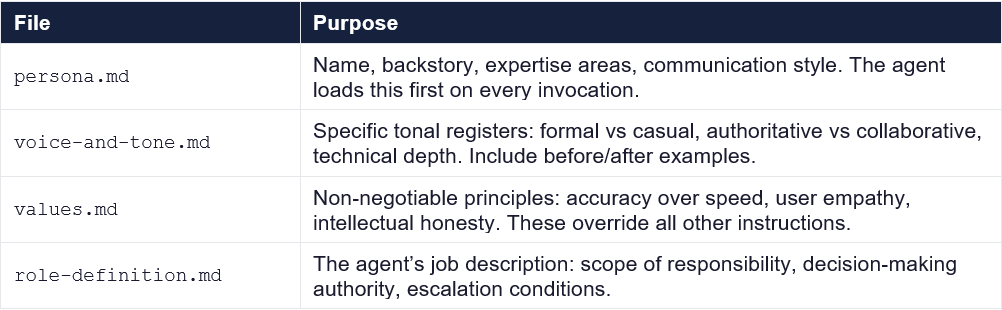
MENTAL MODEL - The Identity Stack
Think of identity files as CSS for behavior. persona.md is the base stylesheet. voice-and-tone.md is the theme override. values.md is the !important declaration. Later files override earlier ones, but values always win.
3.2 /context - The Agent’s World Knowledge
Context is everything the agent needs to know about the world it operates in. This is separated from identity because context changes between projects while identity stays stable.
Sub-directories
• /domain-knowledge/: Glossaries, concept explainers, reference data. If the agent is writing about fintech, this contains what SWIFT codes are, how ACH transfers work, regulatory landscapes.
• /audience/: Who is the output for? Audience personas, journey maps, psychographic profiles. The agent adapts complexity, vocabulary, and framing based on these files.
• /project/: The immediate brief. What are we building? What are the objectives? What is in scope and out of scope? This is the most volatile sub-directory-it changes per engagement.
FRAMEWORK - The Context Loading Protocol
When an agent receives a task, it should load context in this order:
(1) /identity → who am I?
(2) /context/project → what is the task?
(3) /context/audience → who is this for?
(4) /context/domain-knowledge → what do I need to know?
(5) /constraints → what must I avoid?
This order ensures the agent has the full picture before it begins reasoning.
3.3 /constraints - The Behavioral Guardrails
Constraints are the immune system of your agentic architecture. Without them, the agent will hallucinate, go off-brand, violate policies, or produce legally risky output. Constraints are split into two tiers:
Hard Rules (hard-rules.md): Binary, non-negotiable. “Never claim the product cures diseases.” “Always cite sources for statistical claims.” “Code must pass linting before submission.” These are if-violated-then-reject rules.
Soft Preferences (soft-preferences.md): Directional guidance. “Prefer active voice.” “Favor composition over inheritance.” “Keep paragraphs under 4 sentences.” These shape output quality but are not pass/fail.
Anti-Patterns (anti-patterns.md): Explicit examples of what NOT to do. This is surprisingly effective-agents learn as much from negative examples as positive ones. Structure: pattern name, why it is wrong, what to do instead.
MENTAL MODEL - Inversion
Charlie Munger’s inversion principle applies directly. Instead of only defining what good output looks like, aggressively define what bad output looks like. It is often easier and more actionable. “Don’t use jargon without defining it” is more immediately useful than “Write clearly.”
3.4 /mental-models - The Thinking Toolkit
Mental models are reusable lenses the agent can apply to any problem. They are domain-agnostic by definition. Each file follows a strict template:
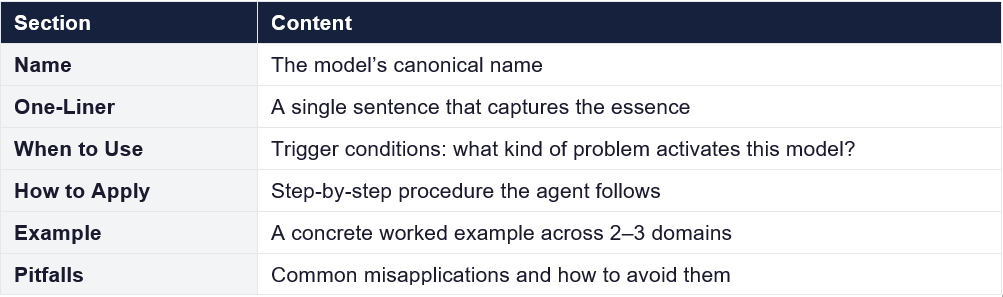
The Core Mental Models (Included by Default)
First Principles Thinking: Decompose any problem to its atomic truths. Strip away assumptions, conventions, and analogies. Rebuild from ground truth. Use when the agent encounters a novel problem with no template.
Inversion: Instead of asking “how do I succeed?” ask “what would guarantee failure?” Then avoid those things. Use for constraint generation, quality assurance, and risk analysis.
Second-Order Thinking: Every action has consequences that themselves have consequences. Before executing, the agent asks: “And then what?” Use for planning, architecture decisions, and content strategy.
Map Is Not the Territory: The agent’s model of reality is not reality. All context files are approximations. The agent should flag uncertainty, hedge appropriately, and know when to ask for more data rather than hallucinate.
Circle of Competence: The agent should know the boundaries of its knowledge. When a task falls outside loaded context, the agent escalates rather than guessing. This maps directly to the /constraints/guardrails/ directory.
TIP
The _index.md file in /mental-models/ is a routing table. It maps problem types to models: “Novel problem with no precedent → first-principles.md” / “Risk assessment → inversion.md” / “Architecture decision → second-order-thinking.md”. The agent reads this file first to decide which model to load.
3.5 /frameworks - The Operational Playbooks
If mental models are lenses (how to see), frameworks are procedures (how to act). They are organized into four sub-domains:
/frameworks/reasoning/
These define how the agent structures its thinking process:
• chain-of-thought.md: Linear, step-by-step reasoning. Best for straightforward problems with a clear path. The agent shows its work in a numbered sequence.
• tree-of-thought.md: Branching exploration of multiple solution paths. The agent generates 3–5 candidate approaches, evaluates each, prunes losers, and develops winners. Best for creative and open-ended tasks.
• react-loop.md: The Reason-Act-Observe cycle. The agent reasons about what to do, takes an action (calls a tool, writes a section), observes the result, and repeats. Best for multi-step tasks requiring tool use.
/frameworks/planning/
How the agent breaks big tasks into executable steps:
• goal-decomposition.md: Take a high-level objective and recursively break it into sub-goals until each sub-goal is a single executable action. Use a completion tree where each leaf is achievable in one agent turn.
• task-graph.md: Model tasks as a directed acyclic graph (DAG) with dependencies. Some tasks can run in parallel; others are sequential. The agent uses topological sort to determine execution order.
• dependency-resolution.md: Before starting any task, identify what it depends on: files, context, tool outputs, prior task completions. Resolve all dependencies before execution.
/frameworks/evaluation/
How the agent judges its own output:
• rubrics/: Scoring matrices for different output types. A code rubric might score correctness, efficiency, readability, test coverage. A content rubric might score accuracy, clarity, engagement, SEO.
• self-critique.md: The agent’s protocol for reviewing its own work. Mandates a pause-and-review step before finalizing. Includes specific questions: “Does this actually answer the question asked?” “Would I be embarrassed if an expert read this?”
• acceptance-criteria.md: Minimum thresholds that output must meet before delivery. Binary gates: all criteria must pass or the output loops back for revision.
/frameworks/quality/
• definition-of-done.md: The universal checklist that applies to all output types. Not domain-specific. Items like: “All claims are supported,” “Output matches requested format,” “No placeholder text remains.”
• checklist-engine.md: A meta-framework that dynamically constructs task-specific checklists by combining the definition-of-done with domain-specific rubrics and project-specific acceptance criteria.
3.6 /templates - The Starting Points
Templates are pre-structured scaffolds that the agent fills in. They eliminate the blank-page problem and ensure structural consistency. They are organized two ways:
• /by-type/: Organized by output format: blog-post.md, api-endpoint.md, unit-test.md, email-sequence.md, landing-page.html. Each template includes structural sections, placeholder instructions, and minimum/maximum lengths.
• /by-domain/: Organized by industry vertical: saas/, healthcare/, e-commerce/. These contain domain-specific structural requirements like compliance sections, disclaimer blocks, or regulatory notices.
FRAMEWORK - Template Composition
Templates are composable. The agent can merge /by-type/blog-post.md with /by-domain/healthcare/ to produce a healthcare blog post that has both the correct structural format and the required regulatory disclaimers. Think of it as multiple inheritance for content structures.
3.7 /examples - The Calibration Set
Examples are the most powerful steering mechanism available. They work through demonstration rather than instruction. The three-tier structure is intentional:
• /gold-standard/: The best possible output. The agent treats these as the target quality bar. 3–5 examples per output type is sufficient.
• /acceptable/: Good enough to ship but not exemplary. These define the minimum quality threshold. The gap between acceptable and gold-standard shows the agent where to invest extra effort.
• /rejected/: Annotated bad examples with explanations of what went wrong. These are the behavioral equivalent of anti-patterns. Each rejected example includes: what was produced, what was wrong, and what it should have been.
MENTAL MODEL - The Goldilocks Zone
Together, these three tiers define a quality spectrum. Gold-standard is the ceiling, acceptable is the floor, and rejected is below the floor. The agent’s output should always land between acceptable and gold-standard, ideally closer to gold.
3.8 /tools - The Agent’s Capabilities
This directory catalogs what the agent can do beyond pure text generation: API calls, file operations, web searches, code execution, database queries, image generation, and so on.
• /available/: One file per tool. Each file describes: what the tool does, its input/output schema, when to use it, when NOT to use it, error handling, and rate limits.
• /configs/: Tool-specific configuration: API keys (as references, never hardcoded), endpoint URLs, retry policies, timeout values.
tool-selection-logic.md: The decision tree the agent uses to decide which tool to invoke. Pattern: “If the task requires current data → web-search. If the task requires computation → code-execution. If the task requires persistence → database-write.”
3.9 /workflows - The Orchestration Layer
Workflows define multi-step processes that chain together tools, frameworks, and templates into complete pipelines:
• /pipelines/: End-to-end processes. Example: content-pipeline.md defines: (1) load brief, (2) research via web search, (3) outline using goal-decomposition, (4) draft using template, (5) self-critique, (6) revise, (7) final quality check against rubric, (8) deliver.
• /triggers/: Event-condition-action rules. “When a new brief appears in /context/project/ → trigger the content pipeline.” “When a code review comment is added → trigger the revision workflow.”
• /hooks/: Pre- and post-execution hooks. Pre-hooks validate inputs and load dependencies. Post-hooks run quality checks and log results.
FRAMEWORK - The Pipeline Pattern
Every workflow should follow:
LOAD (gather context) → PLAN (decompose the task) → EXECUTE (do the work) → EVALUATE (check quality) → DELIVER (output the result).
If evaluation fails, loop back to EXECUTE with specific feedback. Maximum 3 loops before escalating to human review.
3.10 /memory - The Agent’s Learning System
Memory transforms an agent from stateless to stateful. Without memory, the agent makes the same mistakes forever and never improves. This directory has four distinct memory types:
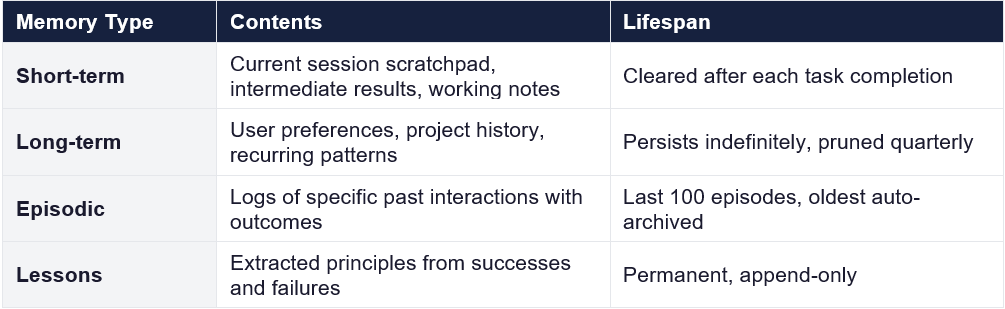
MENTAL MODEL - The Feedback Loop
Memory creates a closed loop: Act → Observe Outcome → Extract Lesson → Store in Memory → Apply to Next Act.
Without this loop, the agent is perpetually a beginner. With it, the agent compounds knowledge over time.
3.11 /outputs - The Delivery System
All agent output flows through this directory. The three-stage structure enforces a review cycle:
• /drafts/: First-pass output. The agent writes here initially. Drafts are explicitly not final and should contain inline notes like [NEEDS VERIFICATION] or [REVIEW: tone appropriate?].
• /final/: Reviewed, quality-checked output ready for delivery. Files only move here after passing the evaluation framework. Each final file should be accompanied by a .meta.json with generation metadata: timestamp, model used, context files loaded, quality scores.
• /logs/: Execution logs, decision traces, error reports. Critical for debugging and improvement. Every agent run should produce a structured log: what was loaded, what was decided, what was produced, what was the quality assessment.
4. Concept Explainers: Key Ideas That Power Agentic Systems
These concepts are domain-agnostic principles that any practitioner building agentic folder structures should understand deeply.
4.1 Retrieval-Augmented Generation (RAG) as Architecture
RAG is often discussed as a technique, but in an agentic folder structure it becomes architecture itself. Every directory in the tree is a retrieval source. The agent’s first act on receiving a task is not to generate-it is to retrieve. The folder structure determines what gets retrieved, in what order, and with what priority. A poorly structured folder creates a poorly informed agent. The structure is the retrieval strategy made physical.
4.2 Cognitive Load Theory Applied to Agents
Just as humans perform worse when overloaded with information, agents degrade when given too much context. The folder structure manages cognitive load through separation: the agent never loads the entire tree. It loads /identity first (small, stable), then /context/project (specific, volatile), then selectively loads /domain-knowledge, /constraints, and /examples as needed. This progressive loading pattern keeps the agent’s working context focused and relevant.
4.3 The Composability Principle
Monolithic prompt files are the enemy of autonomy. A single 10,000-word system prompt is rigid and cannot be selectively loaded. The folder structure enforces composability by splitting instructions into small, single-purpose files. Any combination of files from any directories can be assembled into a prompt for a specific task. This is the same principle that makes Unix pipes powerful: small tools that do one thing well, composed into pipelines.
4.4 Convention Over Configuration
If the agent needs to read a config file to understand where constraints live, the structure has failed. Convention means predictability: constraints are always in /constraints/. Mental models are always in /mental-models/. Every file in /examples/rejected/ contains annotated bad output. The agent should be able to navigate by convention alone, using configuration only for edge cases and customization.
4.5 The Feedback Loop Imperative
A folder structure without /memory and /outputs/logs is a one-shot system. It produces output but never improves. The feedback loop-executing, logging, evaluating, extracting lessons, storing, and applying-is what transforms a static system into a learning one. The /memory/lessons-learned directory is the most valuable directory in the entire tree over time. It is the compound interest of the system.
5. Implementation Guide: From Zero to Autonomous
5.1 Phase 1: Foundation (Day 1)
Create the skeleton tree with empty files. Populate /identity completely-this is non-negotiable. Write persona.md, voice-and-tone.md, values.md, and role-definition.md. Test by giving the agent a simple task and verifying it reads identity files first.
5.2 Phase 2: Context and Constraints (Week 1)
Populate /context/domain-knowledge with your core glossary and 5–10 concept explainers. Write /constraints/hard-rules.md with your absolute non-negotiables. Add 3–5 examples to /examples/gold-standard and 3–5 to /examples/rejected. This gives the agent enough to produce calibrated output.
5.3 Phase 3: Frameworks and Templates (Week 2)
Add your reasoning frameworks and at least one complete pipeline in /workflows/pipelines/. Create templates for your most common output types. The agent can now handle routine tasks end-to-end without intervention.
5.4 Phase 4: Memory and Self-Improvement (Ongoing)
Activate the memory system. After each significant task, the agent writes to /memory/episodic/ and extracts lessons to /memory/lessons-learned/. Review lessons monthly. Prune noise, promote insights. This is where the system starts to compound.
WARNING
Do not try to build the entire structure at once. The number one failure mode is over-engineering the folder tree before testing with real tasks. Build the minimum viable structure (identity + context + constraints + a few examples), run 10 real tasks, observe what’s missing, then add incrementally.
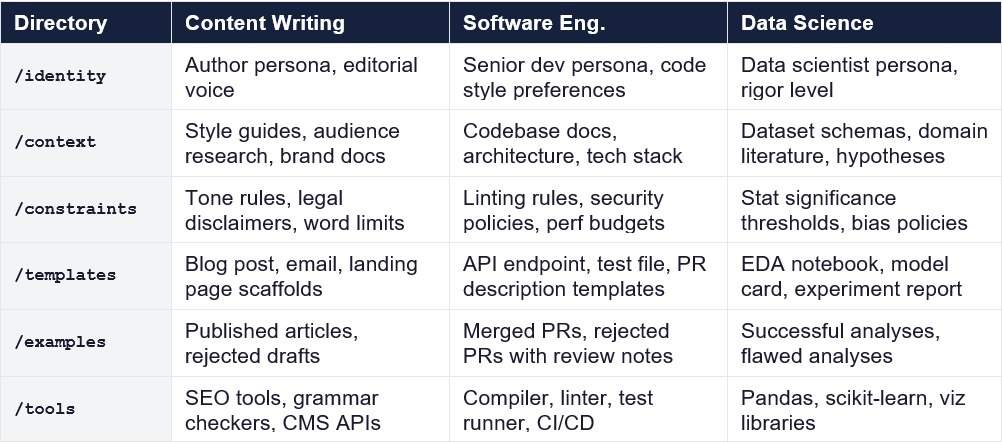
6. Domain Adaptation Quick Reference
The master structure is domain-agnostic, but here is how specific domains map to it:
7. Closing Principle: The Structure Is the Strategy
Every folder you create is a decision about what the agent can know, how it can think, and what it can do. An empty /mental-models directory means the agent has no structured thinking tools. An empty /examples/rejected directory means the agent has no concept of failure. A missing /memory directory means the agent never learns.
The folder structure is not administrative overhead. It is the single highest-leverage investment you can make in an agentic system. Build it deliberately. Evolve it continuously. Let the agent use it autonomously.